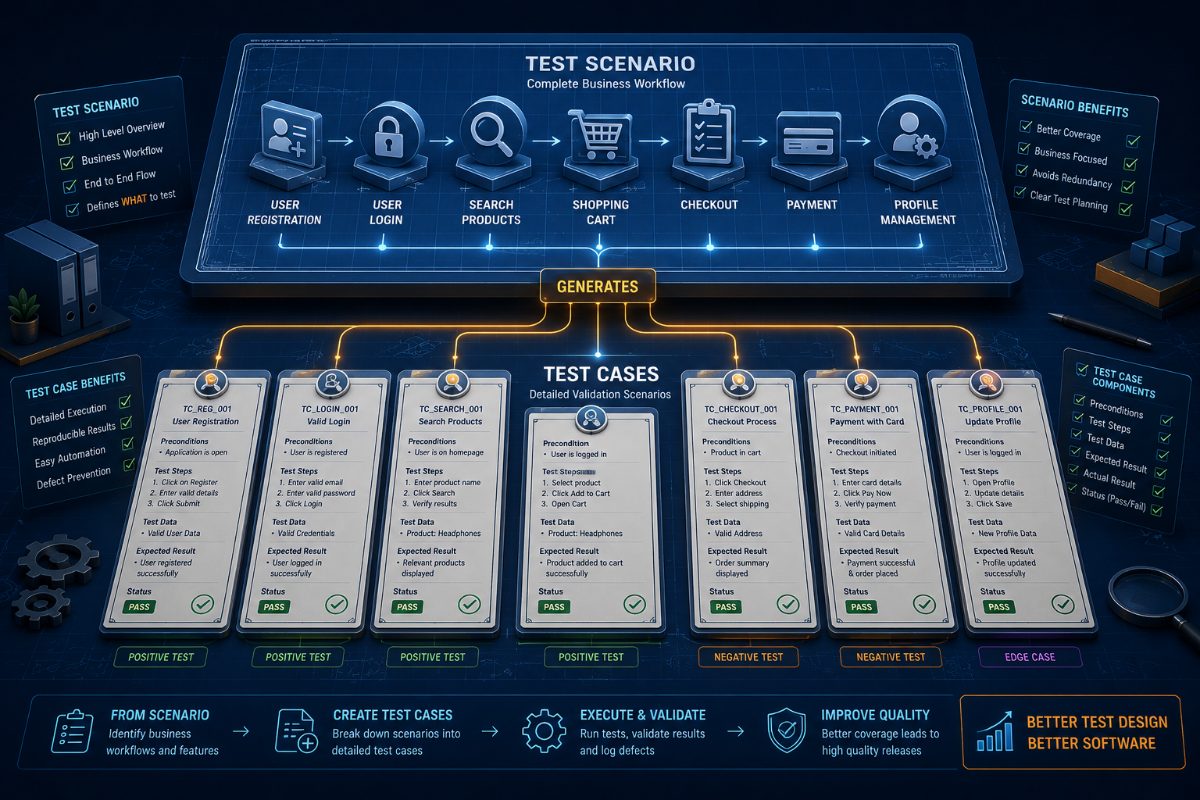
Test Case vs Test Scenario: What's the Difference? (Complete Guide for QA Engineers)
Every QA engineer has encountered this question at some point:
"Should I write a Test Scenario or a Test Case?"
For beginners, the two terms often sound identical.
Even experienced teams sometimes use them interchangeably.
But they serve different purposes.
Understanding the distinction helps teams create better test documentation, improve testing efficiency, and avoid unnecessary work.
In this guide, you'll learn what Test Scenarios and Test Cases are, how they differ, when to use each, real-world examples, common mistakes, and how AI is changing test design.
---
What Is a Test Scenario?
A Test Scenario is a high-level description of something that should be tested.
Think of it as answering the question:
"What needs to be verified?"
It doesn't describe every step.
Instead, it identifies a business workflow or feature.
Examples include:
- Verify user login
- Verify user registration
- Verify checkout
- Verify payment
- Verify search functionality
- Verify password reset
- Verify user profile updates
A Test Scenario acts as a roadmap for QA.
---
What Is a Test Case?
A Test Case is a detailed set of instructions used to validate a Test Scenario.
It answers:
"How should it be tested?"
A Test Case contains:
- Preconditions
- Test steps
- Test data
- Expected results
- Actual results
- Pass/Fail status
Unlike a Test Scenario, it provides precise execution instructions.
---
Example
Test Scenario
Verify user login.
Simple.
Now convert it into Test Cases.
Test Case 1
Login using valid credentials.
Expected Result:
User reaches Dashboard.
---
Test Case 2
Login using invalid password.
Expected Result:
Display "Invalid Credentials."
---
Test Case 3
Login with blank username.
Expected Result:
Validation message appears.
---
Test Case 4
Login with blank password.
Expected Result:
Password required message.
---
Test Case 5
Login with locked account.
Expected Result:
Access denied.
One Test Scenario often produces many Test Cases.
---
Test Case vs Test Scenario
| Test Scenario | Test Case |
|---------------|-----------|
| High-level description | Detailed validation |
| Defines what to test | Defines how to test |
| Covers business workflow | Covers execution steps |
| Fewer in number | Usually many per scenario |
| Used during planning | Used during execution |
Both are essential.
Scenarios provide coverage.
Test Cases provide precision.
---
Why QA Teams Need Both
Imagine testing an eCommerce application.
Without Test Scenarios, teams may forget important workflows.
Without Test Cases, testers may execute inconsistent validations.
Together they ensure:
- Better coverage
- Repeatable testing
- Easier collaboration
- Better documentation
- Faster onboarding
- More reliable releases
---
Real-World Example
For an online shopping website:
Test Scenario
Verify Checkout Process.
Possible Test Cases include:
✔ Checkout with Credit Card
✔ Checkout with Debit Card
✔ Checkout using Wallet
✔ Checkout with Coupon
✔ Checkout with Guest User
✔ Checkout with Logged-in User
✔ Checkout with Invalid Address
✔ Checkout with Expired Card
One Scenario.
Many Test Cases.
---
Common Mistakes
Many QA teams create problems by:
• Writing Test Cases without Test Scenarios.
• Creating unnecessary detailed Test Cases.
• Duplicating Test Cases.
• Forgetting edge cases.
• Missing business workflows.
These mistakes increase maintenance and reduce productivity.
---
Best Practices
Successful QA teams follow these principles.
Start with Test Scenarios.
Convert each scenario into multiple Test Cases.
Reuse Test Cases whenever possible.
Keep Test Cases simple and independent.
Review test documentation regularly.
Update Test Cases whenever business requirements change.
---
How AI Is Transforming Test Design
Traditionally, writing Test Cases has been a manual process.
Large applications often require thousands of Test Cases.
Maintaining them consumes enormous effort.
AI changes this completely.
Instead of manually creating Test Cases, QA engineers simply describe a feature.
For example:
"Verify the checkout workflow."
The AI automatically generates:
- Test Scenarios
- Positive Test Cases
- Negative Test Cases
- Edge Cases
- Browser validation
- Expected outcomes
It dramatically reduces documentation effort while improving test coverage.
---
How RoboQA Helps
RoboQA allows QA teams to generate and execute browser tests using AI.
Simply describe the workflow.
RoboQA can:
- Generate Test Scenarios
- Generate Test Cases
- Execute browser workflows
- Detect UI issues
- Capture screenshots
- Generate bug reports
- Produce release confidence scores
Instead of spending hours writing repetitive documentation, QA teams can focus on improving software quality.
---
Final Thoughts
Test Scenarios and Test Cases are closely related—but they are not the same.
A Test Scenario identifies what should be tested.
A Test Case explains exactly how to test it.
Using both together helps QA teams build structured, repeatable, and scalable testing processes.
As AI continues to reshape software testing, creating and maintaining Test Cases is becoming faster, smarter, and significantly less manual than ever before.
FAQ
Frequently Asked Questions
What is a Test Scenario?
A Test Scenario is a high-level description of a feature, business process, or workflow that should be tested.
It answers the question:
"What should be tested?"
Examples include:
- Verify Login
- Verify User Registration
- Verify Checkout
- Verify Search Functionality
---
What is a Test Case?
A Test Case is a detailed document that describes exactly how to validate a Test Scenario.
It typically contains:
- Preconditions
- Test Steps
- Test Data
- Expected Results
- Actual Results
- Pass/Fail Status
It answers the question:
"How should it be tested?"
---
What is the difference between a Test Scenario and a Test Case?
A Test Scenario identifies the functionality to be tested.
A Test Case provides detailed execution steps to verify that functionality.
One Test Scenario usually contains multiple Test Cases.
---
Can one Test Scenario have multiple Test Cases?
Yes.
For example:
Test Scenario: Verify User Login
Possible Test Cases:
- Login with valid credentials
- Login with invalid password
- Login with empty username
- Login with locked account
- Login using social authentication
This ensures comprehensive coverage.
---
Which should be created first?
QA teams generally create Test Scenarios first.
Once the business workflows are identified, detailed Test Cases are written for each scenario.
This approach keeps testing organized and prevents missing important functionality.
---
Are Test Scenarios required in Agile projects?
Absolutely.
Although Agile teams often maintain lighter documentation, Test Scenarios help ensure complete business coverage while Test Cases provide repeatable validation steps.
---
Can AI generate Test Cases automatically?
Yes.
Modern AI testing tools can analyze requirements or natural language prompts to generate:
- Test Scenarios
- Positive Test Cases
- Negative Test Cases
- Boundary Test Cases
- Edge Cases
- Expected Results
This significantly reduces manual documentation effort.
---
How does RoboQA help?
RoboQA enables QA teams to generate Test Scenarios and Test Cases using AI.
Simply describe a feature such as:
"Verify the checkout process."
RoboQA can automatically generate browser-based test scenarios, execute workflows, detect UI issues, capture screenshots, create bug reports, and provide release confidence scores.
RoboQA CTA
Stop Writing Hundreds of Test Cases Manually
Modern software changes every day.
Your testing documentation should keep pace.
With RoboQA, simply describe the feature you want to validate.
RoboQA automatically:
✅ Generates Test Scenarios
✅ Creates Detailed Test Cases
✅ Executes Browser Tests
✅ Detects UI Issues
✅ Captures Screenshots
✅ Generates AI Bug Reports
✅ Produces Release Confidence Scores
✅ Supports Continuous Testing in CI/CD
Focus less on repetitive documentation and more on delivering exceptional software quality.
Experience AI-powered software testing with RoboQA.