System Testing Explained: Complete Guide for Modern QA Teams (2026)
Software isn't considered ready because individual modules work.
It isn't even considered ready because integrated services communicate correctly.
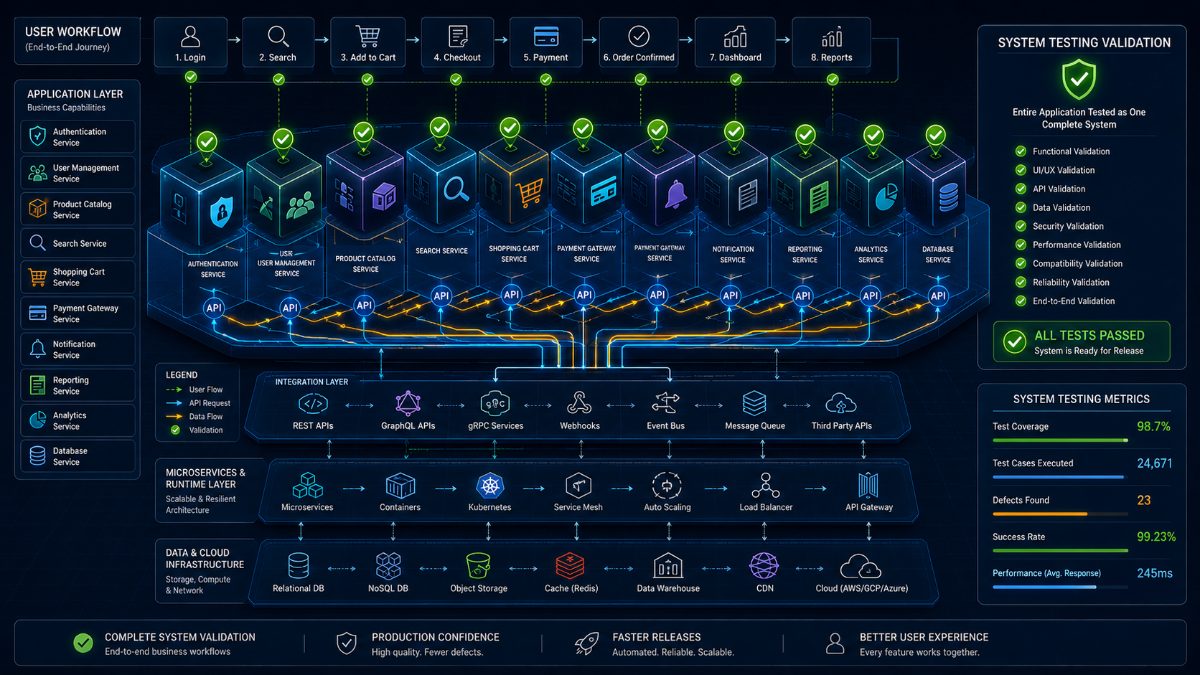
A product is only ready when the entire application functions as one complete system.
That's exactly what System Testing validates.
It answers one simple but critical question:
"Does the complete software product work exactly as intended?"
Before customers use your application, QA teams must verify that every component—frontend, backend, APIs, databases, authentication, notifications, reporting, and third-party integrations—works together as a finished product.
In this guide, you'll learn what System Testing is, why it matters, real-world examples, testing types, best practices, common challenges, and how AI is transforming modern system validation.
---
What Is System Testing?
System Testing is the process of validating an entire software application as a complete system.
Instead of testing individual components, QA engineers test the fully integrated application against business requirements.
The goal is to verify that customers can successfully use the software exactly as expected.
System Testing happens after Integration Testing and before User Acceptance Testing (UAT).
---
Why System Testing Matters
Modern applications contain dozens of interconnected technologies.
A typical SaaS platform may include:
- Frontend UI
- Authentication
- REST APIs
- Databases
- Payment gateways
- Notification services
- Analytics
- Cloud infrastructure
- External integrations
Even if every module works individually, the entire application may still fail.
System Testing ensures everything functions together before release.
---
What Does System Testing Validate?
System Testing validates:
✔ User Registration
✔ Login
✔ Password Reset
✔ Product Search
✔ Shopping Cart
✔ Checkout
✔ Payment Processing
✔ User Dashboard
✔ Notifications
✔ Reports
✔ Role-based Access
✔ API Communication
✔ Database Updates
✔ Performance
✔ Security
Everything is tested as one complete application.
---
Example of System Testing
Imagine testing an online shopping platform.
A tester performs the following workflow:
1. Open homepage
2. Register a new account
3. Verify email
4. Login
5. Search products
6. Add products to cart
7. Apply discount coupon
8. Complete payment
9. Verify order creation
10. Check inventory updates
11. Receive confirmation email
12. View order history
13. Logout
If every step succeeds, the system behaves correctly from the user's perspective.
---
Types of System Testing
System Testing includes multiple validation types:
Functional Testing
Ensures every business feature behaves correctly.
Performance Testing
Measures speed and scalability under load.
Security Testing
Checks authentication, authorization, and vulnerabilities.
Usability Testing
Evaluates user experience and interface consistency.
Compatibility Testing
Validates browsers, devices, and operating systems.
Recovery Testing
Ensures the application recovers after failures.
Reliability Testing
Measures long-term application stability.
---
System Testing vs Integration Testing
| Integration Testing | System Testing |
|---------------------|---------------|
| Tests communication between modules | Tests the complete application |
| Focuses on interfaces | Focuses on business workflows |
| Smaller scope | Entire product |
| Developer + QA | Mostly QA |
Integration Testing verifies components.
System Testing verifies the finished software product.
---
Common Challenges
Traditional System Testing introduces several challenges.
Large Test Suites
Enterprise applications may require thousands of scenarios.
Long Execution Time
Testing complete systems consumes significant time.
Script Maintenance
UI updates frequently break automation.
Third-Party Dependencies
External APIs often introduce instability.
Cross-Browser Validation
Applications must work consistently across Chrome, Firefox, Safari, Edge, Android, and iOS.
---
Best Practices
Successful QA teams follow these practices:
- Prioritize business-critical workflows.
- Automate repetitive validations.
- Use production-like test environments.
- Test across browsers and devices.
- Run continuously inside CI/CD pipelines.
- Monitor failures using centralized reporting.
---
AI Is Transforming System Testing
Traditional System Testing required maintaining extensive Selenium or Playwright frameworks.
AI changes this completely.
Instead of writing browser automation scripts, QA engineers describe expected user behavior.
For example:
"Verify a customer can register, purchase a subscription, and receive a confirmation email."
AI automatically:
- Opens browsers
- Executes workflows
- Validates results
- Detects UI changes
- Captures screenshots
- Generates bug reports
- Measures performance
- Calculates release confidence
The result is faster execution with significantly less maintenance.
---
How RoboQA Simplifies System Testing
RoboQA enables engineering teams to validate complete applications using AI-powered browser automation.
Simply describe the expected workflow.
RoboQA automatically:
- Executes browser tests
- Validates complete systems
- Detects UI issues
- Finds broken workflows
- Generates bug reports
- Captures screenshots
- Measures performance
- Produces AI-powered release confidence scores
Instead of maintaining thousands of automation scripts, teams can focus on delivering high-quality software faster.
---
Final Thoughts
Individual features don't define software quality.
Complete user experiences do.
System Testing ensures that every connected component behaves correctly before software reaches customers.
Combined with AI-powered browser automation, modern QA teams can execute comprehensive System Testing faster, with less maintenance, and with greater confidence than ever before.
As software architectures continue becoming more complex, AI-driven System Testing will become an essential part of every successful release strategy.
---
About RoboQA
RoboQA is an AI-powered browser testing platform that enables QA teams to automate website testing using natural language instead of complex automation code.
From functional testing and regression testing to complete System Testing, RoboQA helps engineering teams release software faster with AI-driven quality assurance.
FAQ
Q1. What is System Testing?
System Testing validates a complete software application after all modules have been integrated.
Q2. When is System Testing performed?
After Integration Testing and before User Acceptance Testing (UAT).
Q3. What is the purpose of System Testing?
To verify that the complete software system meets business and functional requirements.
Q4. Is System Testing automated?
It can be performed manually, through automation frameworks, or AI-powered testing platforms like RoboQA.
Q5. What is the difference between Integration Testing and System Testing?
Integration Testing validates communication between modules, while System Testing validates the entire application.