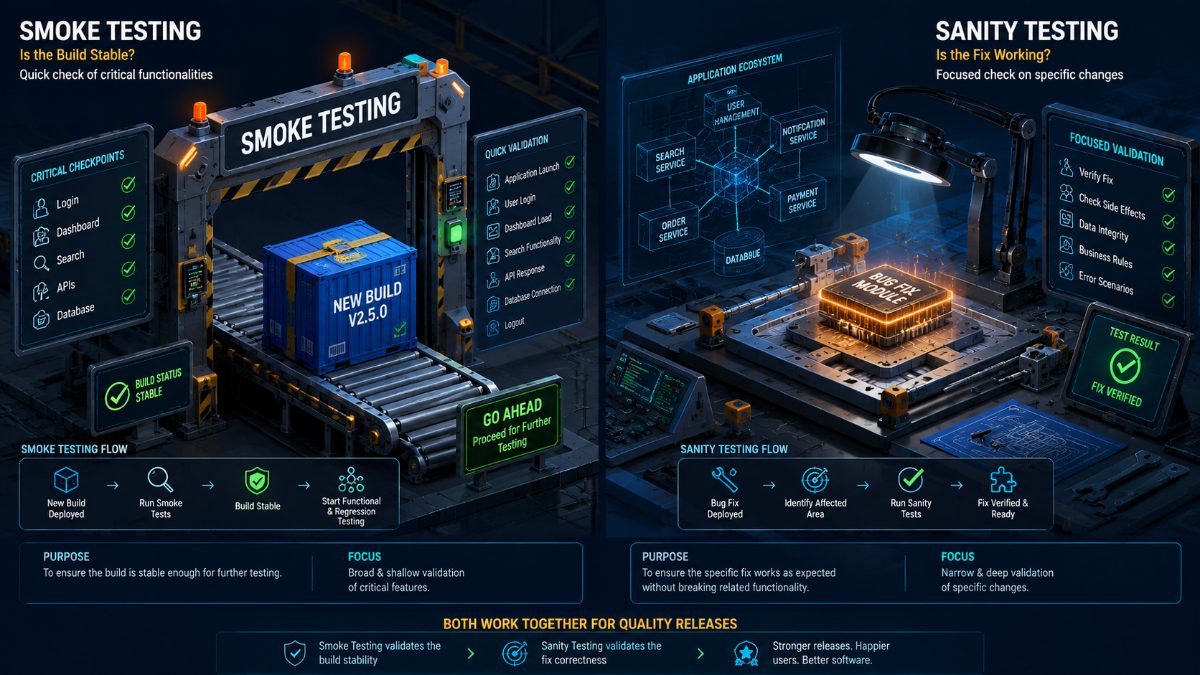
Smoke Testing vs Sanity Testing: Understanding the Difference Before Every Release
Every software release begins with one important question:
Is this build worth testing?
After bug fixes, another question quickly follows:
Did the fix actually work without creating new problems?
These two questions are answered by two different testing approaches:
Smoke Testing
and
Sanity Testing
Many people confuse these testing types because both are quick validation activities performed before deeper testing begins.
However, they serve completely different purposes.
Understanding when to perform Smoke Testing versus Sanity Testing helps QA teams save time, reduce wasted testing effort, and release software with greater confidence.
In this guide, you'll learn the differences, real-world examples, best practices, and how AI is simplifying both testing approaches.
---
What Is Smoke Testing?
Smoke Testing is a high-level validation performed on a new software build to determine whether the application is stable enough for further testing.
Think of it as a health check.
QA engineers verify that the most critical features are working before investing time in detailed testing.
If Smoke Testing fails, the build is immediately rejected.
There is no point performing Functional, Regression, or End-to-End Testing on an unstable build.
---
Common Smoke Test Scenarios
A Smoke Test usually validates:
- Application launches successfully
- Login works
- Dashboard loads
- Navigation works
- Database connection succeeds
- Basic search works
- Main pages open correctly
- Critical APIs respond
- Users can log out
The goal isn't complete validation.
It's simply confirming the application is usable.
---
What Is Sanity Testing?
Sanity Testing is a focused validation performed after small code changes or bug fixes.
Instead of testing the entire application, QA engineers verify only the affected functionality.
For example, suppose developers fix a bug where discount coupons fail during checkout.
Sanity Testing would verify:
- Coupons apply correctly
- Final price updates
- Checkout completes
- Payment succeeds
The tester isn't concerned with unrelated features like profile updates or notifications.
The objective is to confirm that the specific fix behaves correctly.
---
Smoke Testing vs Sanity Testing
| Smoke Testing | Sanity Testing |
|---------------|----------------|
| Validates an entire build | Validates a specific change |
| Broad testing scope | Narrow testing scope |
| Performed after new deployment | Performed after bug fixes |
| Determines build stability | Determines fix correctness |
| Usually scripted | Often focused and exploratory |
Although both are quick tests, their goals are completely different.
Smoke Testing asks:
"Can we begin testing?"
Sanity Testing asks:
"Did this specific fix actually work?"
---
Real-World Example
Imagine your team deploys Version 5.2 of an eCommerce application.
Before testing begins, QA performs Smoke Testing.
They verify:
- Homepage loads
- Login works
- Product Search works
- Shopping Cart opens
- Checkout opens
Everything looks healthy.
Testing begins.
Later, developers fix a production bug involving coupon calculations.
QA performs Sanity Testing.
They verify only:
- Coupon validation
- Discount calculation
- Tax calculation
- Checkout total
- Payment confirmation
The rest of the application doesn't need full validation.
---
Why Teams Need Both
Without Smoke Testing, QA engineers may spend hours testing a build that cannot even support basic workflows.
Without Sanity Testing, bug fixes may be marked complete without actually solving the reported issue.
Together they create a faster and more efficient release process.
Smoke Testing protects QA effort.
Sanity Testing protects code quality.
---
Common Mistakes
Many organizations unintentionally waste valuable testing time.
Some common mistakes include:
• Running complete Regression Testing before Smoke Testing.
• Executing full application testing after every small bug fix.
• Treating Smoke and Sanity Testing as identical activities.
• Ignoring automation opportunities.
These practices increase execution time without improving software quality.
---
Best Practices
Successful QA teams follow a structured release process.
1. Perform Smoke Testing immediately after deployment.
2. Reject unstable builds quickly.
3. Execute Functional Testing for new features.
4. Perform Sanity Testing after bug fixes.
5. Run Regression Testing before release.
6. Automate repetitive validation wherever possible.
This layered approach delivers faster releases with greater confidence.
---
How AI Is Changing Smoke and Sanity Testing
Traditional Smoke and Sanity Testing often rely on manually maintained browser automation scripts.
As applications evolve, these scripts become expensive to maintain.
AI introduces a simpler workflow.
Instead of writing automation code, QA engineers describe the expected validation in plain English.
For example:
"Verify the application launches successfully and users can log in."
Or:
"Validate that discount coupons now calculate correctly during checkout."
The AI automatically:
- Launches browsers
- Executes workflows
- Validates expected behavior
- Detects UI issues
- Captures screenshots
- Generates detailed reports
- Produces release confidence scores
Testing becomes faster while reducing maintenance effort.
---
How RoboQA Simplifies Release Validation
RoboQA enables engineering teams to automate Smoke Testing and Sanity Testing using AI-powered browser automation.
Simply describe what you want to verify.
RoboQA automatically:
- Executes browser workflows
- Validates business functionality
- Detects UI issues
- Generates bug reports
- Captures screenshots
- Performs cross-browser validation
- Measures performance
- Produces release readiness reports
Instead of maintaining automation scripts, QA teams spend more time improving software quality.
---
Final Thoughts
Smoke Testing and Sanity Testing may appear similar, but they solve different problems.
Smoke Testing determines whether a build is stable enough for testing.
Sanity Testing verifies that a specific change behaves correctly.
Together, they help QA teams reduce wasted effort, improve release quality, and accelerate software delivery.
As AI continues transforming browser testing, these validation activities are becoming faster, smarter, and easier to automate than ever before.
FAQ
Frequently Asked Questions
What is Smoke Testing?
Smoke Testing is a quick, high-level validation performed on a newly deployed software build to determine whether the application is stable enough for further testing. It verifies only the most critical workflows rather than every feature.
---
What is Sanity Testing?
Sanity Testing is a focused testing approach performed after a bug fix or minor code change. It ensures the modified functionality works correctly without performing a full regression test.
---
What is the main difference between Smoke Testing and Sanity Testing?
Smoke Testing checks whether an entire application build is stable enough for QA testing.
Sanity Testing verifies that a specific bug fix or functionality works correctly after changes have been made.
---
Which testing should be performed first?
Smoke Testing is performed immediately after deploying a new build.
Sanity Testing is performed later whenever developers deliver a specific bug fix or small enhancement.
---
Can Smoke Testing and Sanity Testing be automated?
Yes.
Both testing types are excellent candidates for automation because they are repetitive, frequently executed, and involve predictable validation steps.
Automating them helps QA teams receive faster feedback after every deployment.
---
Is Smoke Testing part of Regression Testing?
No.
Smoke Testing determines whether the application is stable enough to begin testing.
Regression Testing validates that existing functionality continues working after changes.
They serve different purposes and are usually performed at different stages of the release cycle.
---
Why is Smoke Testing important in CI/CD?
Modern CI/CD pipelines deploy software frequently.
Automated Smoke Testing immediately detects broken builds before additional testing begins, preventing wasted testing effort and reducing deployment risks.
---
How does AI improve Smoke and Sanity Testing?
AI enables QA engineers to describe test scenarios in natural language.
Instead of maintaining browser automation scripts, AI automatically:
• Executes browser workflows
• Validates expected outcomes
• Detects UI issues
• Captures screenshots
• Generates bug reports
• Produces release confidence scores
This significantly reduces maintenance while improving testing efficiency.
---
How does RoboQA help?
RoboQA allows QA teams to perform AI-powered Smoke Testing and Sanity Testing without writing browser automation code.
Simply describe the workflow to validate.
RoboQA automatically executes browser actions, validates business flows, detects bugs, captures screenshots, generates reports, and integrates into CI/CD pipelines.
RoboQA CTA
Validate Every Release with Confidence Using RoboQA
Every software deployment deserves a quick health check.
Whether you're validating an entire build or verifying a single bug fix, RoboQA helps you release faster with AI-powered browser testing.
With RoboQA, you can:
✅ Automate Smoke Testing
✅ Perform Intelligent Sanity Testing
✅ Execute Browser Workflows
✅ Detect UI Issues Automatically
✅ Capture Screenshots
✅ Generate AI Bug Reports
✅ Calculate Release Confidence Scores
✅ Integrate with CI/CD Pipelines
Stop maintaining fragile automation scripts.
Start testing with AI.
Experience smarter software testing with RoboQA.