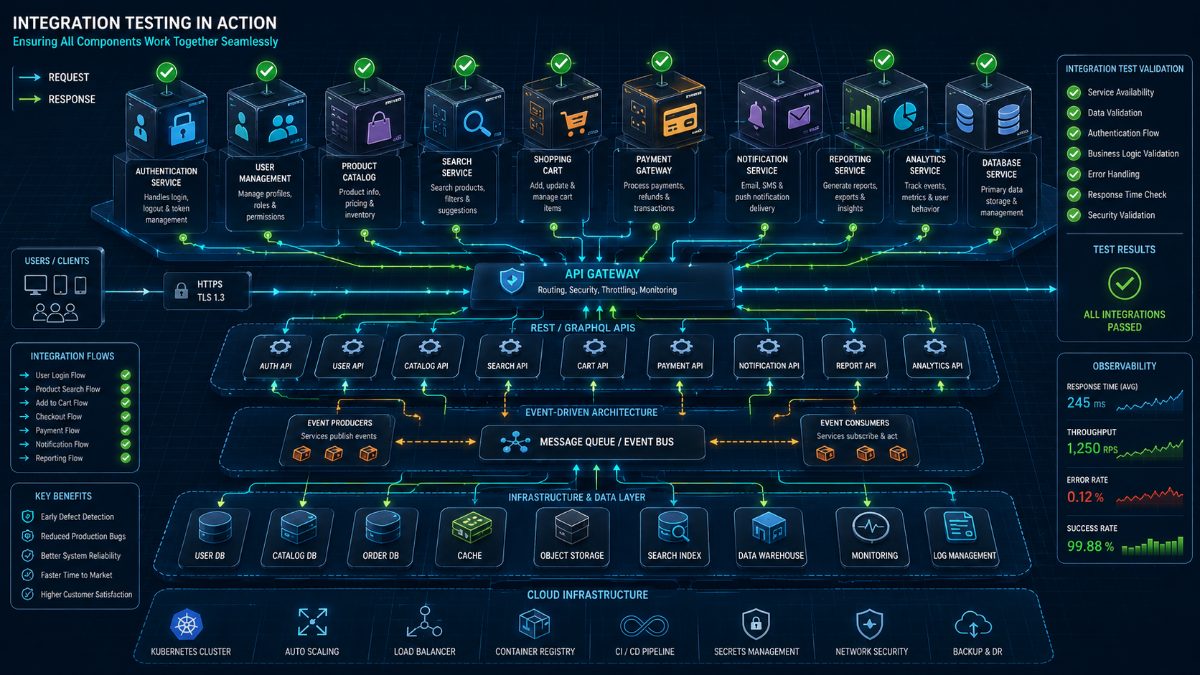
Integration Testing Explained: Complete Guide for Modern Software Teams (2026)
Modern software isn't built as one giant application anymore.
It's built from dozens—or even hundreds—of independent services.
Authentication.
Payments.
Notifications.
Databases.
Search.
Inventory.
Analytics.
Billing.
Each service may work perfectly on its own.
But if they can't communicate with one another, the application still fails.
This is exactly why Integration Testing exists.
Instead of verifying individual components, Integration Testing ensures that multiple modules work together exactly as intended.
In this guide, you'll learn what Integration Testing is, why it matters, real-world examples, best practices, common challenges, and how AI is changing modern integration testing.
---
What Is Integration Testing?
Integration Testing verifies that two or more software components communicate correctly after being combined.
Rather than testing features independently, Integration Testing focuses on how systems exchange information.
For example:
- Does Login successfully retrieve user information from the database?
- Does Checkout communicate with the Payment Gateway?
- Does Payment trigger Order Creation?
- Does Order Creation notify Inventory?
- Does Inventory trigger Shipping?
- Does Shipping send confirmation emails?
Every interaction between services is validated.
The goal is simple:
Ensure connected systems work together without failures.
---
Why Integration Testing Matters
Modern SaaS applications rely on interconnected architectures.
A single customer action may involve multiple backend services.
Consider placing an online order.
One click may trigger:
- Authentication Service
- Product Catalog
- Inventory System
- Pricing Engine
- Discount Service
- Tax Calculation
- Payment Gateway
- Order Management
- Notification Service
- Analytics Platform
If just one integration breaks, the entire workflow fails.
Customers don't know which API failed.
They only know they couldn't complete their purchase.
Integration Testing helps prevent these failures before software reaches production.
---
Real-World Integration Testing Example
Imagine an eCommerce application.
A customer clicks Buy Now.
Behind the scenes, dozens of systems communicate.
The workflow may look like this:
1. User Login
2. Authentication validates credentials
3. Product details retrieved
4. Inventory availability checked
5. Pricing calculated
6. Coupons applied
7. Payment Gateway processes transaction
8. Order created
9. Database updated
10. Shipping request generated
11. Email confirmation sent
12. Analytics records purchase
Every step depends on successful communication.
Integration Testing validates the entire chain.
---
Types of Integration Testing
Different projects use different integration strategies.
Big Bang Integration
All modules are combined together and tested simultaneously.
Advantages:
- Simple setup
- Useful for smaller applications
Disadvantages:
- Difficult debugging
- Failures become harder to isolate
---
Incremental Integration
Modules are integrated one at a time.
Advantages:
- Easier debugging
- Faster issue isolation
- Better scalability
Most enterprise teams prefer this approach.
---
Top-Down Integration
Testing begins with high-level modules before lower-level services are integrated.
Useful when business workflows are developed first.
---
Bottom-Up Integration
Testing begins with low-level modules like databases or utilities before integrating user-facing services.
Often used for backend-heavy systems.
---
Integration Testing vs Unit Testing
Many teams confuse these two testing levels.
| Unit Testing | Integration Testing |
|--------------|--------------------|
| Tests one component | Tests multiple connected components |
| Focuses on internal logic | Focuses on communication |
| Fast execution | Moderate execution |
| Uses mocks frequently | Uses real integrations |
| Developer-focused | QA and engineering focused |
Both are essential.
Unit Testing ensures individual modules work.
Integration Testing ensures they work together.
---
Integration Testing vs End-to-End Testing
These approaches also serve different purposes.
| Integration Testing | End-to-End Testing |
|--------------------|-------------------|
| Validates communication between modules | Validates complete customer journeys |
| Backend focused | User focused |
| Tests APIs and services | Tests entire applications |
| Moderate execution time | Longer execution time |
| Finds communication issues | Finds workflow failures |
Most mature engineering teams perform both before production releases.
---
Common Integration Testing Scenarios
Integration Testing is valuable wherever multiple systems exchange data.
Examples include:
✔ Authentication with Database
✔ Login with Identity Provider
✔ Shopping Cart with Inventory
✔ Checkout with Payment Gateway
✔ Order Management with Shipping
✔ CRM with Email Service
✔ Billing with Subscription Platform
✔ Mobile App with Backend APIs
✔ Reporting with Analytics Engine
✔ Notifications with Messaging Services
Every connected system becomes a testing candidate.
---
Common Challenges
Although essential, Integration Testing isn't always simple.
Complex Dependencies
Applications may depend on dozens of external services.
Testing every dependency becomes difficult.
---
Third-Party APIs
Payment gateways.
Shipping providers.
SMS services.
Cloud platforms.
If external systems fail, integration tests may fail too.
---
Environment Configuration
Different testing environments often contain different configurations.
Small mismatches can create false failures.
---
Data Synchronization
One service may update immediately while another processes asynchronously.
Poor synchronization causes inconsistent results.
---
Debugging
When dozens of systems communicate simultaneously, locating the exact failure becomes time-consuming.
This is one reason integration defects are often expensive to fix.
---
Best Practices
Successful QA teams follow these principles.
Test Critical Integrations First
Start with the highest business impact workflows.
Examples include:
- Login
- Payments
- Checkout
- User Registration
- Billing
---
Automate API Validation
Automated integration tests run faster and more consistently than manual testing.
---
Use Realistic Test Data
Production-like datasets reveal issues that synthetic data often misses.
---
Include Error Scenarios
Don't only validate successful communication.
Also verify:
- API failures
- Timeout responses
- Invalid payloads
- Authentication failures
- Service outages
---
Integrate Into CI/CD
Every deployment should automatically validate critical integrations before release.
Continuous Integration depends heavily on reliable Integration Testing.
---
How AI Is Transforming Integration Testing
Traditional Integration Testing required engineers to manually build API scripts and automation frameworks.
Every service update often required maintenance.
AI changes this approach.
Instead of scripting every interaction, QA teams describe expected business behavior.
For example:
"Verify checkout successfully updates inventory, processes payment, creates the order, and sends a confirmation email."
An AI testing platform understands the workflow.
It automatically:
- Executes API requests
- Launches browser validation
- Verifies responses
- Detects broken integrations
- Captures screenshots
- Generates bug reports
- Measures performance
- Produces release confidence scores
Testing becomes faster while reducing maintenance costs.
---
How RoboQA Simplifies Integration Testing
RoboQA helps QA teams validate complete software integrations using AI-powered browser testing.
Instead of maintaining thousands of automation scripts, engineers simply describe the expected workflow.
RoboQA automatically:
- Validates browser interactions
- Executes integration workflows
- Detects broken APIs
- Identifies failed communications
- Generates detailed bug reports
- Captures visual evidence
- Measures performance
- Calculates release confidence
- Produces AI-powered quality insights
Teams spend less time maintaining automation and more time shipping reliable software.
---
Final Thoughts
Today's software is an ecosystem of interconnected services.
Even when individual components work perfectly, poor communication between systems can break the entire customer experience.
Integration Testing ensures these services work together before users ever encounter them.
As software architectures continue evolving toward APIs, microservices, and cloud-native applications, Integration Testing has become one of the most important stages of modern quality assurance.
Combined with AI-powered browser testing, it is becoming faster, smarter, and dramatically easier to maintain.
The future of software quality isn't just testing features.
It's validating how every connected system works together.
Frequently Asked Questions (FAQs)
1. What is Integration Testing?
Integration Testing verifies that multiple software modules, APIs, databases, or services communicate correctly after being integrated. Instead of testing individual components, it validates the interactions between them.
---
2. Why is Integration Testing important?
Modern applications rely on interconnected services. A failure in communication between modules can break entire business workflows, even if each individual component works correctly. Integration Testing helps identify these issues before production.
---
3. What is the difference between Unit Testing and Integration Testing?
Unit Testing verifies individual functions or classes in isolation, while Integration Testing validates communication between multiple connected components such as APIs, databases, authentication services, and microservices.
---
4. What is the difference between Integration Testing and End-to-End Testing?
Integration Testing focuses on how systems communicate internally. End-to-End Testing validates complete customer journeys from the user's perspective, including browser interactions and business workflows.
---
5. When should Integration Testing be performed?
Integration Testing is typically performed after Unit Testing and before System Testing or End-to-End Testing. It is also commonly executed automatically within CI/CD pipelines.
---
6. What are common Integration Testing examples?
Typical examples include:
- Login communicating with the authentication service
- Shopping cart updating inventory
- Checkout processing payments
- Order creation triggering shipping
- Notifications sending confirmation emails
- CRM synchronizing customer information
---
7. Can Integration Testing be automated?
Yes. Most modern engineering teams automate Integration Testing using API testing tools, browser automation platforms, and AI-powered testing solutions to continuously validate software integrations.
---
8. What challenges exist in Integration Testing?
Some common challenges include:
- Third-party API failures
- Complex microservice architectures
- Environment configuration issues
- Data synchronization problems
- Difficult debugging across multiple services
---
9. How does AI improve Integration Testing?
AI reduces manual scripting by understanding natural language test scenarios, automatically executing workflows, validating API responses, detecting failures, generating bug reports, and producing release confidence scores.
---
10. How does RoboQA help with Integration Testing?
RoboQA allows QA teams to describe complete software workflows in natural language. The platform automatically executes browser actions, validates integrations, detects defects, captures screenshots, generates bug reports, and provides AI-powered release insights.