Compatibility Testing Explained: Ensure Your Software Works Everywhere (2026)
Imagine launching a beautiful new web application.
Everything works perfectly on your laptop.
The development team celebrates.
Customers begin using the application.
Then the complaints start arriving.
"The login button doesn't work on Safari."
"The checkout page is broken on my iPhone."
"The dashboard layout is completely distorted on Firefox."
Nothing changed in your code.
The problem is that your software wasn't tested everywhere your users work.
This is why Compatibility Testing is essential.
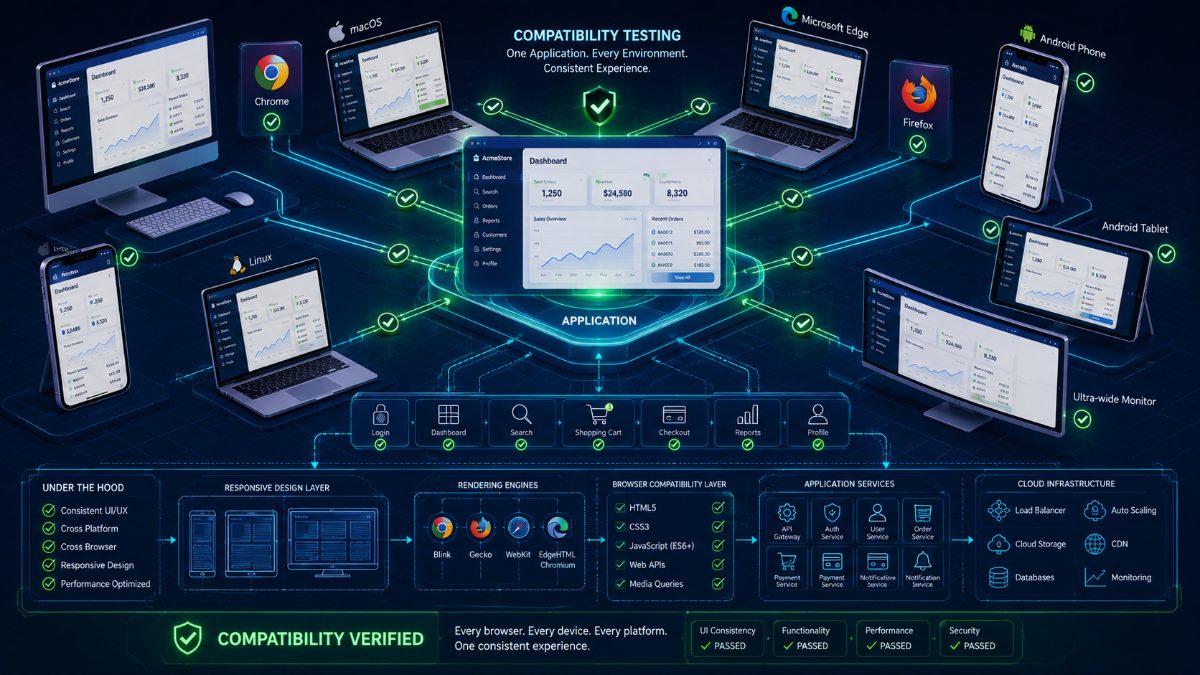
Compatibility Testing ensures that an application behaves consistently across different browsers, operating systems, devices, screen sizes, hardware configurations, and network environments.
Modern users access applications from hundreds of combinations of browsers and devices. If your application works perfectly in Chrome but fails in Safari or on Android, your users won't blame their browser—they'll blame your product.
In this guide, you'll learn what Compatibility Testing is, why it matters, different types, practical examples, common challenges, best practices, and how AI is transforming cross-platform software validation.
---
What Is Compatibility Testing?
Compatibility Testing verifies that software functions correctly across different environments.
Instead of validating one browser or one operating system, Compatibility Testing ensures that users receive the same reliable experience regardless of where they access the application.
The objective is simple:
One application. Every user. Every device.
---
Why Compatibility Testing Matters
Users don't all have the same setup.
Your customers may access your application using:
- Google Chrome
- Mozilla Firefox
- Microsoft Edge
- Safari
- Android devices
- iPhones
- Windows
- macOS
- Linux
- Tablets
- Foldable phones
- High-resolution monitors
Every environment renders applications slightly differently.
Without Compatibility Testing, seemingly minor differences can become major production issues.
---
Types of Compatibility Testing
Compatibility Testing includes several categories.
Browser Compatibility
Verifies behavior across Chrome, Firefox, Safari, Edge, Opera, and other browsers.
Operating System Compatibility
Ensures software works correctly on Windows, macOS, Linux, Android, and iOS.
Device Compatibility
Tests applications on desktops, laptops, tablets, smartphones, and foldable devices.
Screen Resolution Compatibility
Validates layouts across different display sizes and resolutions.
Network Compatibility
Ensures acceptable performance under Wi-Fi, mobile data, and slow network conditions.
---
Real-World Example
Imagine an eCommerce application.
A Compatibility Test validates:
- User Registration
- Login
- Product Search
- Filters
- Shopping Cart
- Checkout
- Payment
- Order Confirmation
These workflows are executed on:
- Chrome (Windows)
- Firefox (Windows)
- Safari (macOS)
- Edge (Windows)
- Android Chrome
- Mobile Safari (iPhone)
If every journey succeeds, the application is ready for a diverse user base.
---
Common Compatibility Issues
QA teams frequently encounter:
- Broken layouts
- Missing fonts
- CSS rendering differences
- JavaScript incompatibilities
- Touch gesture issues
- Media playback problems
- Browser-specific API behavior
- Responsive design failures
Many of these issues remain invisible unless tested on multiple environments.
---
Best Practices
Successful Compatibility Testing includes:
- Prioritize browsers based on user analytics.
- Test critical business workflows first.
- Validate responsive layouts.
- Include real devices whenever possible.
- Automate repetitive compatibility checks.
- Run tests continuously within CI/CD pipelines.
---
AI Is Transforming Compatibility Testing
Traditional Compatibility Testing requires maintaining large device labs and browser farms.
AI simplifies this process.
Instead of manually repeating the same workflow across dozens of environments, AI automatically:
- Launches multiple browsers
- Executes user journeys
- Detects visual differences
- Identifies browser-specific failures
- Captures screenshots
- Generates detailed compatibility reports
QA teams gain broader coverage with significantly less effort.
---
How RoboQA Simplifies Compatibility Testing
RoboQA enables engineering teams to validate browser compatibility using natural language.
Simply describe the workflow.
RoboQA automatically:
- Executes tests across supported browsers
- Validates responsive layouts
- Detects UI inconsistencies
- Captures screenshots
- Generates AI-powered bug reports
- Produces release confidence scores
Instead of maintaining complex browser automation suites, teams focus on delivering a consistent experience for every user.
---
Final Thoughts
Your users don't care which browser they're using.
They expect your application to work.
Compatibility Testing ensures that expectation becomes reality.
As applications continue expanding across browsers, operating systems, and devices, AI-powered Compatibility Testing will become an essential part of every modern QA strategy.
---
About RoboQA
RoboQA is an AI-powered browser testing platform that helps QA teams validate websites across multiple browsers and devices using natural language. From Functional Testing to Compatibility Testing, RoboQA enables engineering teams to release software faster with greater confidence.