Black Box Testing vs White Box Testing: Complete Guide for QA Engineers (2026)
One of the first concepts every software tester learns is the difference between Black Box Testing and White Box Testing.
Although both aim to improve software quality, they approach testing from completely different perspectives.
One focuses on what the software does.
The other focuses on how the software works internally.
Understanding the strengths and limitations of each approach helps QA teams design more effective testing strategies and deliver higher-quality software.
In this guide, we'll explain Black Box Testing, White Box Testing, real-world examples, comparison tables, best practices, and how AI is transforming both testing approaches.
---
What Is Black Box Testing?
Black Box Testing validates software without knowing its internal implementation.
The tester interacts with the application exactly like an end user.
They don't need access to:
- Source code
- Database design
- APIs
- Algorithms
- System architecture
Instead, they focus entirely on inputs and outputs.
The question becomes:
"Does the application behave correctly?"
---
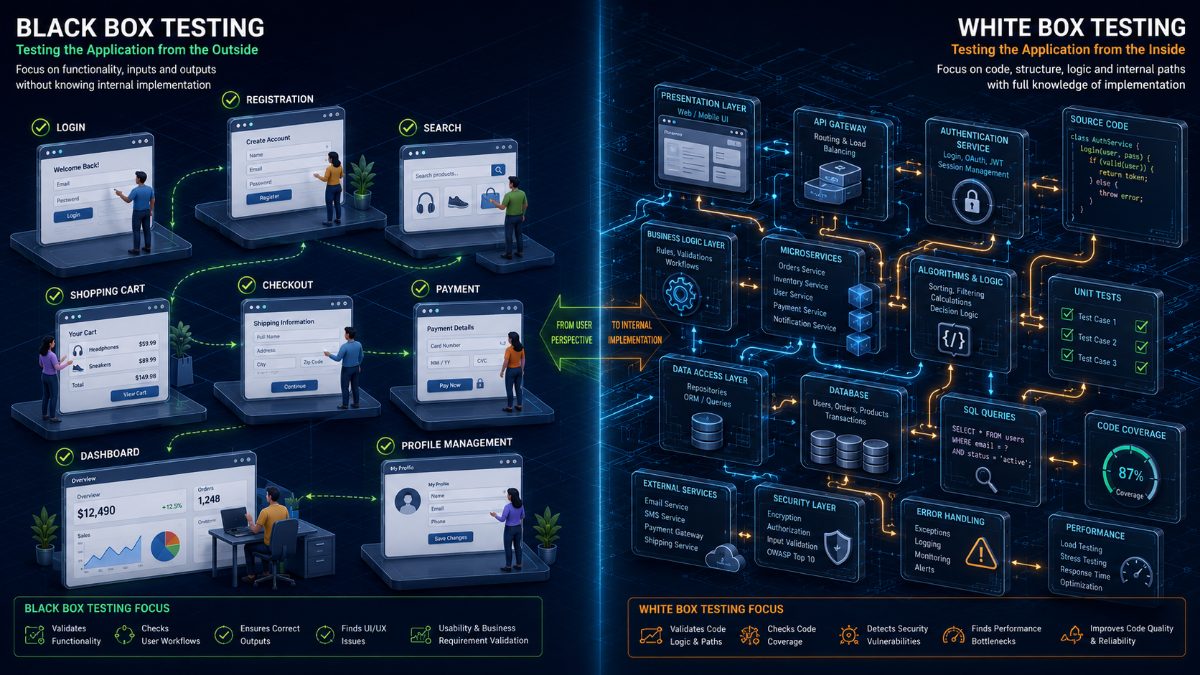
Examples of Black Box Testing
A tester may verify:
- User Login
- Registration
- Product Search
- Shopping Cart
- Checkout
- Password Reset
- Dashboard Navigation
- Payment Processing
The tester doesn't care how these features are implemented.
They only verify whether they work correctly.
---
What Is White Box Testing?
White Box Testing validates the internal logic of the software.
The tester has access to:
- Source code
- Functions
- Classes
- APIs
- Algorithms
- Database queries
Instead of testing only the visible functionality, White Box Testing verifies how the application executes internally.
It answers:
"Is the code working correctly?"
---
Examples of White Box Testing
Developers or automation engineers may verify:
- Code Coverage
- Branch Coverage
- Statement Coverage
- Loop Coverage
- Exception Handling
- Database Queries
- Security Logic
- Authentication Algorithms
These tests ensure the underlying implementation behaves as expected.
---
Black Box Testing vs White Box Testing
| Black Box Testing | White Box Testing |
|-------------------|-------------------|
| No code knowledge required | Source code required |
| User perspective | Developer perspective |
| Validates functionality | Validates implementation |
| Tests inputs and outputs | Tests internal logic |
| Performed by QA | Often performed by Developers or SDETs |
Both approaches complement each other.
Neither replaces the other.
---
Real-World Example
Imagine an eCommerce application.
Black Box Testing
QA verifies:
✔ Login
✔ Search
✔ Cart
✔ Checkout
✔ Payment
Everything appears to work.
---
White Box Testing
Developers verify:
✔ Authentication methods
✔ SQL queries
✔ Payment APIs
✔ Error handling
✔ Security validations
✔ Code coverage
The application may appear correct externally while still containing hidden code defects.
---
Advantages of Black Box Testing
- No programming knowledge required
- Closely simulates real user behavior
- Ideal for Functional Testing
- Excellent for Acceptance Testing
- Detects UI and business logic issues
---
Advantages of White Box Testing
- Improves code quality
- Detects hidden logic errors
- Measures code coverage
- Improves security
- Finds performance bottlenecks
- Validates algorithms
---
Challenges
Black Box Testing may miss hidden implementation issues.
White Box Testing may overlook user experience problems.
Combining both approaches provides much stronger software quality than relying on either one alone.
---
Best Practices
Successful engineering teams combine multiple testing techniques.
Perform Black Box Testing to validate business workflows.
Perform White Box Testing during development to validate internal implementation.
Automate repetitive validations.
Integrate testing into CI/CD pipelines.
Review coverage regularly.
Use AI to improve both testing strategies.
---
How AI Is Transforming Software Testing
Traditionally, Black Box Testing required large numbers of manual or browser automation scripts.
White Box Testing depended heavily on code reviews and unit testing.
AI is changing both.
Today, QA engineers can describe business workflows using natural language.
AI automatically:
- Generates browser tests
- Creates Test Cases
- Executes workflows
- Detects UI issues
- Identifies failures
- Produces bug reports
- Generates release confidence scores
Developers can also use AI to analyze code, detect vulnerabilities, identify uncovered paths, and recommend additional test coverage.
The result is faster, smarter, and more comprehensive software testing.
---
How RoboQA Helps
RoboQA enables engineering teams to automate browser-based Black Box Testing using AI.
Simply describe the workflow you want to validate.
RoboQA automatically:
- Generates browser tests
- Executes user journeys
- Detects UI issues
- Captures screenshots
- Generates AI bug reports
- Produces release confidence scores
- Supports continuous testing in CI/CD
Instead of maintaining complex browser automation frameworks, QA teams can focus on delivering better software.
---
Final Thoughts
Black Box Testing and White Box Testing approach software quality from different angles.
Black Box Testing validates what users experience.
White Box Testing validates how the software works internally.
Together they provide stronger quality assurance, greater confidence before release, and fewer production defects.
As AI continues transforming software engineering, both testing approaches are becoming faster, smarter, and easier to integrate into modern development workflows.
FAQ
Frequently Asked Questions
What is Black Box Testing?
Black Box Testing is a software testing technique where testers validate application functionality without knowing the internal code, architecture, or implementation.
The tester focuses only on inputs, outputs, and expected behavior.
---
What is White Box Testing?
White Box Testing is a testing technique where testers or developers validate the application's internal logic, source code, algorithms, and implementation.
It helps ensure the software works correctly behind the scenes.
---
What is the main difference between Black Box Testing and White Box Testing?
Black Box Testing focuses on what the software does.
White Box Testing focuses on how the software works internally.
Both approaches complement each other and are essential for building reliable software.
---
Who performs Black Box Testing?
Black Box Testing is typically performed by:
- QA Engineers
- Manual Testers
- Automation Testers
- Product Testers
- End Users during UAT
Programming knowledge is generally not required.
---
Who performs White Box Testing?
White Box Testing is commonly performed by:
- Developers
- Software Development Engineers in Test (SDETs)
- Automation Engineers
- Security Engineers
Since it requires access to source code, programming knowledge is essential.
---
Is Black Box Testing manual or automated?
It can be both.
Black Box Testing may involve manual exploratory testing or automated browser testing using tools such as Selenium, Playwright, Cypress, or AI-powered testing platforms.
---
Which testing approach finds more bugs?
Neither approach is inherently better.
Black Box Testing is excellent for finding:
- Functional defects
- UI issues
- Workflow failures
- User experience problems
White Box Testing is better at finding:
- Logic errors
- Security vulnerabilities
- Performance issues
- Uncovered code paths
- Algorithm defects
The best software teams use both.
---
How is AI changing Black Box Testing?
Modern AI testing platforms allow QA engineers to describe application behavior using natural language.
Instead of writing browser automation scripts, AI automatically:
- Generates test cases
- Executes browser workflows
- Detects UI issues
- Captures screenshots
- Produces bug reports
- Calculates release confidence
This dramatically reduces maintenance effort.
---
How does RoboQA help?
RoboQA simplifies AI-powered Black Box Testing by allowing QA teams to automate browser testing without writing code.
Simply describe what you want to test.
RoboQA automatically:
- Executes browser workflows
- Detects UI issues
- Captures screenshots
- Generates AI bug reports
- Performs cross-browser validation
- Produces release readiness reports
RoboQA CTA
Experience Smarter Black Box Testing with RoboQA
Traditional browser automation requires continuous script maintenance.
RoboQA replaces repetitive automation coding with AI-powered browser testing.
Simply describe the workflow you want to validate.
RoboQA automatically:
✅ Executes Browser Tests
✅ Generates Test Cases
✅ Validates Business Workflows
✅ Detects UI Issues
✅ Captures Screenshots
✅ Produces AI Bug Reports
✅ Measures Performance
✅ Calculates Release Confidence
Spend less time maintaining automation frameworks and more time building high-quality software.
Start AI-powered browser testing with RoboQA today.