AI Visual Testing: The Complete Guide to Detecting UI Changes Before Your Users Do (2026)
Customers don't care if your API returns HTTP 200.
They care if the "Buy Now" button disappears.
They care if text overlaps on mobile.
They care if checkout buttons become invisible after deployment.
These are visual bugs.
And surprisingly, they're among the most common production defects modern software teams face.
Traditional automation verifies functionality.
Visual Testing verifies appearance.
Artificial Intelligence is now making Visual Testing dramatically more intelligent by detecting UI changes that humans and traditional automation often miss.
In this guide, you'll learn how AI Visual Testing works, why it's becoming essential for modern QA teams, and how it improves software quality.
---
What is AI Visual Testing?
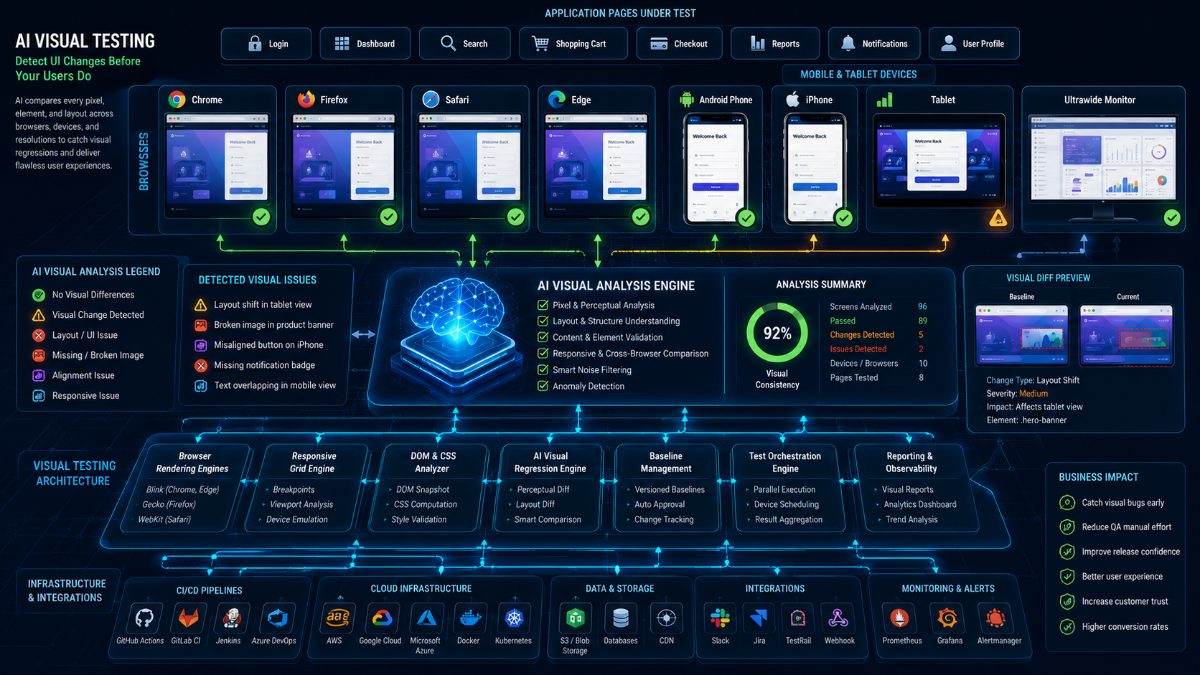
AI Visual Testing automatically compares application screens across releases to identify unexpected visual differences.
Instead of checking only HTML elements or CSS selectors, AI analyzes the application exactly as users see it.
It detects:
- Layout shifts
- Missing components
- Font inconsistencies
- Broken images
- Incorrect colors
- Alignment problems
- Responsive design failures
- Cross-browser rendering issues
Unlike pixel-perfect comparison tools that often generate false positives, AI understands whether a visual change is actually meaningful.
---
Why Visual Bugs Matter
A visually broken application creates a poor first impression.
Examples include:
- Checkout button hidden behind another element
- Login form shifted outside the viewport
- Navigation menu disappearing
- Broken product images
- Mobile layouts overlapping
- Dashboard widgets displaying incorrectly
- Payment confirmation page partially hidden
Most of these issues still allow automation tests to pass.
Your Selenium script clicks the button successfully.
Your customer never even sees it.
---
Traditional Visual Testing Challenges
Traditional visual comparison tools usually rely on pixel-by-pixel screenshots.
That creates problems:
- Minor font rendering differences
- Browser-specific rendering
- Dynamic timestamps
- Animated content
- Personalized dashboards
- Responsive layouts
These often generate hundreds of false positives.
QA engineers spend more time reviewing screenshots than finding real defects.
---
How AI Improves Visual Testing
Artificial Intelligence understands context.
Instead of asking:
"Did one pixel change?"
AI asks:
"Did the user experience change?"
It recognizes meaningful differences while ignoring acceptable visual variations.
Examples include:
- Button moved off-screen
- Checkout flow broken
- Navigation missing
- Product image disappeared
- Mobile layout collapsed
- Dashboard chart no longer visible
These are issues customers immediately notice.
---
Benefits of AI Visual Testing
Fewer False Positives
AI ignores insignificant rendering differences while highlighting genuine UI defects.
Faster Reviews
Instead of manually comparing hundreds of screenshots, QA teams review AI-prioritized changes.
Better Cross-Browser Validation
Visual consistency is verified across Chrome, Firefox, Safari, Edge, Android, and iOS.
Improved Responsive Testing
AI ensures applications look correct on every screen size.
Higher Customer Satisfaction
Visual issues are detected before customers encounter them.
---
Real-World Example
Imagine an online retail application.
Developers release a new homepage.
Functionally:
- Login works.
- Search works.
- Shopping cart works.
- Checkout works.
Everything passes.
But AI Visual Testing detects:
- Hero banner covering navigation.
- "Add to Cart" button hidden on tablets.
- Checkout button partially outside the screen on iPhones.
- Product images stretched in Safari.
- Footer links overlapping on smaller laptops.
Without AI, many of these issues could reach production.
---
Best Practices
- Include Visual Testing in every CI/CD deployment.
- Capture baseline screenshots after approved releases.
- Validate all critical customer journeys.
- Test multiple browsers and screen sizes.
- Combine functional and visual automation for complete quality coverage.
---
Why AI Visual Testing Matters
Today's users expect flawless interfaces.
A single broken layout can reduce trust, increase support tickets, and hurt conversions.
AI Visual Testing helps engineering teams identify those issues before release.
---
💡 RoboQA Insight
Traditional automation verifies functionality.
AI Visual Testing verifies the customer experience.
The combination delivers significantly higher software quality than either approach alone.
---
Why QA Teams Choose RoboQA
RoboQA combines intelligent Browser Testing, AI-powered Visual Testing, Regression Testing, API Testing, and Bug Detection into one platform.
Instead of relying on separate tools, engineering teams can validate complete customer journeys using AI-driven quality assurance.
---
Final Thoughts
As modern applications become increasingly dynamic, visual quality becomes just as important as functional correctness.
Artificial Intelligence enables software teams to detect UI regressions faster, reduce manual review effort, and confidently deliver polished user experiences.
Visual Testing is no longer optional.
It's becoming a core pillar of intelligent software quality.