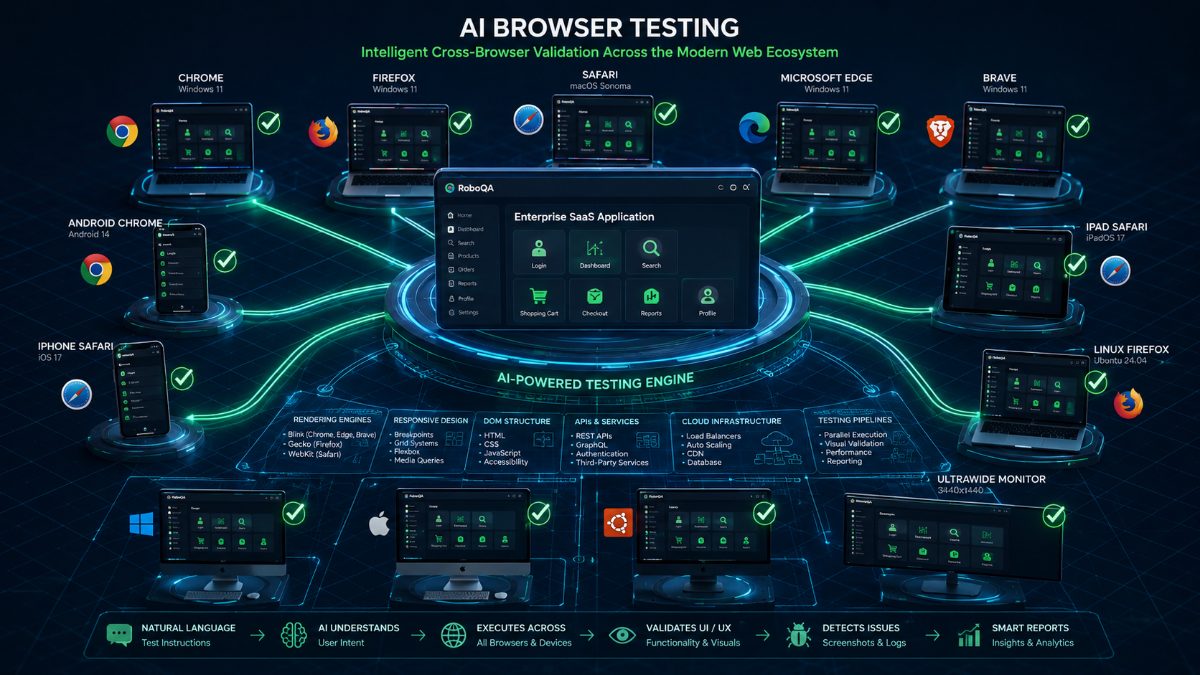
AI Browser Testing: The Complete Guide to Intelligent Cross-Browser Testing (2026)
Modern web applications no longer run on a single browser.
Your customers may use Chrome on Windows, Safari on macOS, Firefox on Linux, Microsoft Edge at work, or Chrome on Android and iPhones.
No matter where they access your application, they expect exactly the same experience.
A broken button in Safari.
A checkout failure in Firefox.
A layout issue on mobile.
Any one of these can cost customers, revenue, and trust.
This is why Browser Testing has always been an essential part of software quality.
But traditional browser testing has become increasingly difficult.
Modern QA teams are now adopting AI Browser Testing to automate cross-browser validation, reduce maintenance, and release software with greater confidence.
In this guide, you'll learn everything about AI Browser Testing, why it's becoming the future of software testing, and how intelligent testing platforms are transforming browser automation.
---
What Is AI Browser Testing?
AI Browser Testing is the process of using artificial intelligence to automatically validate web applications across multiple browsers, operating systems, and devices while minimizing manual scripting and automation maintenance.
Instead of creating hundreds of browser-specific automation scripts, AI understands user behavior, identifies interface elements intelligently, adapts to UI changes, and executes complete workflows across supported environments.
The objective remains simple:
Ensure every customer experiences a consistent, reliable application regardless of their browser or device.
---
Why Browser Testing Is More Important Than Ever
Today's applications operate in a highly fragmented ecosystem.
Users access software from:
- Chrome
- Firefox
- Safari
- Microsoft Edge
- Brave
- Android browsers
- iOS Safari
- Tablets
- Laptops
- Desktop workstations
- High-resolution monitors
- Ultra-wide displays
Even though web standards continue improving, rendering engines still behave differently.
Small CSS differences.
JavaScript compatibility issues.
Responsive layout bugs.
Browser-specific APIs.
Authentication behaviors.
Payment integrations.
Every browser introduces unique variables.
Ignoring browser compatibility often results in production defects that affect real customers.
---
Traditional Browser Testing Challenges
Many QA teams still depend on large Selenium or Playwright test suites.
While effective, maintaining them becomes increasingly expensive.
Common challenges include:
Frequent UI Changes
Changing a single button ID or CSS selector may break dozens of automation scripts.
Massive Browser Matrix
Testing every combination of:
- Browser
- Browser version
- Operating system
- Screen size
- Device
creates hundreds of possible execution environments.
Slow Maintenance
Engineers often spend more time repairing tests than creating new ones.
Flaky Tests
Timing issues, animations, asynchronous loading, and unstable selectors frequently generate false failures.
These problems reduce confidence in automated testing.
---
What AI Changes
Artificial intelligence approaches browser testing differently.
Instead of relying entirely on static selectors, AI understands:
- User intent
- Screen structure
- Visual hierarchy
- Application behavior
- Workflow context
Rather than saying:
"Click element #loginButton"
AI understands:
"Open the Login page and sign in as a customer."
This dramatically reduces maintenance while improving test resilience.
---
Example AI Browser Testing Workflow
Imagine testing an eCommerce website.
The AI receives a simple instruction:
Verify a customer can purchase a laptop successfully.
The AI automatically:
- Opens the homepage
- Finds Login
- Signs in
- Searches for laptops
- Applies filters
- Opens a product
- Adds it to the cart
- Applies a coupon
- Completes checkout
- Confirms payment
- Verifies the confirmation page
- Captures screenshots
- Reports defects if any step fails
The QA engineer never manually scripts each browser interaction.
---
Benefits of AI Browser Testing
Faster Automation
Natural-language instructions replace hundreds of automation scripts.
---
Lower Maintenance
AI adapts better to interface changes.
Small UI updates no longer require hours of script repairs.
---
Better Cross-Browser Coverage
Execute the same workflow across:
- Chrome
- Firefox
- Safari
- Edge
- Android
- iOS
without duplicating automation logic.
---
Improved Release Confidence
AI validates complete customer journeys before every deployment.
Engineering teams release faster with greater confidence.
---
AI Browser Testing vs Traditional Browser Automation
| Traditional Automation | AI Browser Testing |
|------------------------|-------------------|
| Script-heavy | Natural language |
| High maintenance | Low maintenance |
| Static selectors | Intelligent element recognition |
| Frequent failures | Adaptive execution |
| Manual debugging | AI-generated diagnostics |
| Limited scalability | Easily scalable |
---
Best Practices
Successful teams follow these principles:
- Prioritize critical customer journeys.
- Execute tests continuously within CI/CD pipelines.
- Validate multiple browsers before every release.
- Capture screenshots for every failure.
- Review AI-generated diagnostics instead of relying solely on pass/fail results.
---
Why This Matters for AI-Powered Testing
Traditional browser automation has helped software teams for years, but maintaining large automation suites across multiple browsers is increasingly time-consuming. Every UI update can trigger broken selectors, flaky tests, and expensive maintenance.
AI-powered browser testing shifts the focus from maintaining scripts to validating user outcomes. Instead of asking engineers to describe every browser action in code, AI understands complete workflows, adapts to interface changes, and provides richer diagnostics. This allows QA teams to spend more time improving product quality and less time repairing automation.
---
Why QA Teams Choose RoboQA
RoboQA brings AI-powered browser testing into a single workflow.
Instead of maintaining extensive automation frameworks, QA teams can describe test scenarios in natural language.
RoboQA automatically:
- Executes browser workflows
- Validates user journeys
- Detects UI issues
- Captures screenshots
- Generates detailed bug reports
- Measures performance
- Produces release confidence scores
This enables engineering teams to test faster, release confidently, and reduce automation maintenance.
---
Final Thoughts
Browser compatibility is no longer optional.
Customers expect flawless experiences regardless of the browser, operating system, or device they choose.
AI Browser Testing represents the next evolution of software quality by combining intelligent automation with adaptive browser validation.
As applications become increasingly complex, AI-powered browser testing will help engineering teams deliver faster releases while maintaining exceptional customer experiences.
---
FAQs
What is AI Browser Testing?
AI Browser Testing uses artificial intelligence to validate web applications across multiple browsers while reducing automation maintenance.
Is AI Browser Testing better than Selenium?
AI complements traditional automation by reducing scripting effort and improving resilience against UI changes.
Which browsers should always be tested?
Chrome, Firefox, Safari, Microsoft Edge, Android Chrome, and iOS Safari cover the majority of modern web users.
Can AI detect UI issues?
Yes. Modern AI testing platforms can identify layout inconsistencies, broken workflows, visual regressions, and functional defects.
How does RoboQA simplify Browser Testing?
RoboQA allows QA teams to describe browser tests in natural language while automatically executing workflows, detecting issues, and generating detailed reports.